
Professional Audio Recording
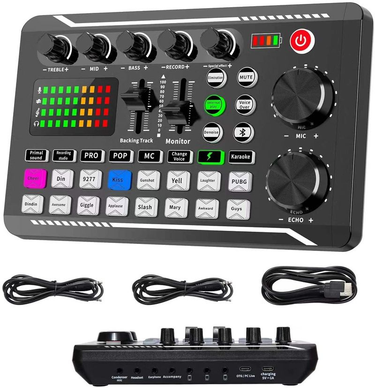
F998/V8S Microphone Live Mixer Board Sound Card Audio Mixing Console Amplifier

F998/V8S Microphone Live Mixer Board Sound Card Audio Mixing Console Amplifier

F998/V8S Live Board Microphone Mixer Sound Card Audio Mixing Console Amplifier

F998/V8S Live Board Microphone Mixer Sound Card Audio Mixing Console Amplifier

Select SK892 HD Voice Recorder Digital Recording Pen MP3 Player

F998/V8S Board Microphone Live Mixer Sound Card Audio Mixing Console Amplifier
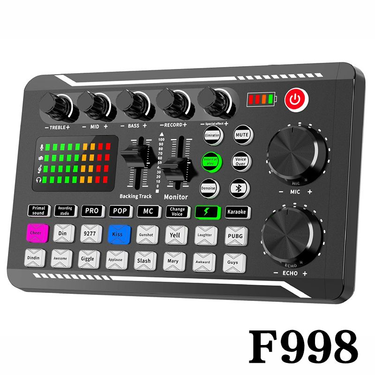
F998/V8S Microphone Live Mixer Board Sound Card Audio Mixing Console Amplifier
F998/V8S Live Board Microphone Mixer Sound Card Audio Mixing Console Amplifier
F998/V8S Microphone Live Mixer Board Sound Card Audio Mixing Console Amplifier
F998/V8S Microphone Live Mixer Board Sound Card Audio Mixing Console Amplifier
F998/V8S Board Microphone Live Mixer Sound Card Audio Mixing Console Amplifier
F998/V8S Microphone Live Mixer Board Sound Card Audio Mixing Console Amplifier
F998/V8S Microphone Live Mixer Board Sound Card Audio Mixing Console Amplifier
Professional Audio Recording: End the Fuzz, Start the Perfect Take
You sit down to record a podcast, a voiceover, or a guitar riff. You hit the red button. You play it back. The sound is thin, distant, or buzzing with background noise. The magic of the moment is buried under a layer of technical frustration. This is the enemy of every creator: poor audio. The solution is not a complex, expensive studio build. It is a curated set of professional audio recording equipment designed to solve your specific pain points. Let's build a workflow that delivers studio-quality sound from your very first take.
Pain: The Thin, Distant Microphone Sound
You speak into your laptop's built-in mic. The audio sounds like you are calling from a tin can. It lacks warmth, presence, and clarity.
Solution: The USB Podcast Microphone
A USB recording microphone is the single most transformative upgrade you can make. It plugs directly into your computer, requires no external audio interface, and delivers broadcast-quality sound. The secret is a larger diaphragm and a cardioid pickup pattern that focuses on your voice while rejecting room noise. The routine becomes: plug in the USB cable, open your recording software, and speak. The result is a warm, full-bodied sound that rivals a professional radio studio. No more tin can audio. For those needing to amplify their voice in larger spaces, Public Address System Installation Sound offers powerful solutions.
Pain: The Hiss and Hum of Background Noise
You are recording in a living room. The fridge hums. A car passes. The computer fan whirs. The recording is unusable.
Solution: The Dynamic Microphone & Shock Mount
A dynamic microphone for podcasting is your secret weapon against background noise. Unlike condenser mics that pick up every rustle, dynamic mics are less sensitive. They focus on the sound source directly in front of them. Pair it with a shock mount microphone stand that isolates the mic from vibrations. The routine: set up the dynamic mic on a boom arm, attach the shock mount, and speak close to the grille. The background noise disappears. Your voice cuts through clean and clear.
Pain: The Crackle and Delay of a Cheap Audio Interface
You want to connect a professional XLR microphone to your computer. You buy a cheap USB adapter. The audio crackles, lags, and drops out.
Solution: The Dedicated Audio Interface
A USB audio interface for home studio is the professional bridge between your microphone and your computer. It provides clean, low-noise preamps, zero-latency monitoring, and multiple inputs for recording with a guest. The routine: plug the mic into the interface with a XLR cable, plug the interface into the computer via USB, and select it as your audio device. The crackle is gone. The latency is zero. The sound is pristine. For live performance needs, Stage Audio gear ensures your sound reaches every corner of the room.
Your New, Efficient Recording Workflow
- Pre-Session Prep: Set up your professional audio recorder or interface on a stable surface. Connect all cables.
- Mic Placement: Position the USB recording microphone or dynamic mic 15–20 cm from your mouth, slightly off-axis to avoid plosives.
- Level Check: Speak at your natural volume. Adjust the gain knob on the interface or mic until the level hits around -12dB. No clipping.
- Record: Hit record in your software. Speak as you normally would.
- Monitor: Use the headphone jack on the interface for zero-latency monitoring. You hear exactly what is being recorded.
- Playback: The result is clean, present, and free of background noise. No post-processing needed for a basic take.
The Multi-Scene Superpower
A portable audio recorder is not just for the studio. It is the ultimate field recorder.
- Morning Interview: Record a conversation in a café with a lapel mic connected to the recorder.
- Afternoon Field Recording: Capture the sound of a forest, a market, or a train station.
- Evening Songwriting: Lay down a rough vocal or guitar idea in your living room.
- Night Podcasting: Record a solo episode with zero setup.
To drive your monitors and headphones with precision, browse Receivers Amplifiers for high-quality amplification options.
The Result
You stop fighting your gear and start focusing on your performance. Professional audio recording equipment does not just improve your sound. It simplifies your setup, eliminates guesswork, and gives you the confidence to hit record anywhere. The pain of the bad take is gone. The joy of the perfect, pristine recording is now your everyday reality.